NewDebug failed jobs and retry from any step.

Platform / Debug

Product 05

Preloop Debug

The missing debugger for your workflows.

In addition to being able to shell into your running job, the preloop debugger lets you set breakpoints and retry from any step in your workflow, all drivable by your agent.

Workflow files
Unchanged
Availability
Available today
Surface
CLI, API and dashboard
LOOP04beats
01Changesnapshot
02Verifyreplay
03Fixpause
04Mergepublish
debug loop poster
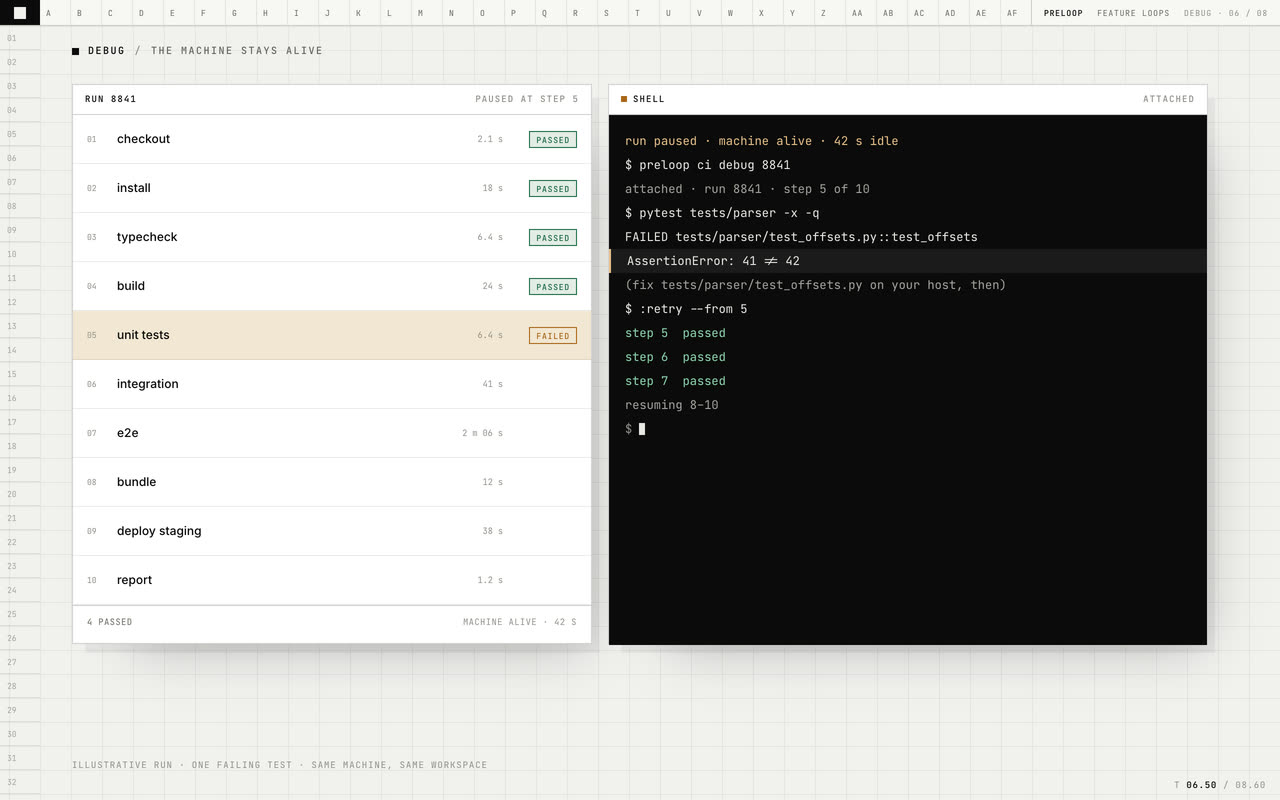
A job fails, pauses, gets fixed in place, and retries.Muted · loops

Why it exists

A failed job often leaves only logs. Rerunning repeats setup and can hide the state that caused the problem. Debug keeps the job available so you can inspect it, make a change, and continue from the step you choose.

Preloop Debug, step by step.

The mechanism, in the order a job meets it.

  1. 01

    Pause

    Pass `--debug` and a failed step pauses the job, keeping its machine available. Start an interactive debug session from the run when you are ready.

  2. 02

    Attach

    Open a shell in the job, or attach your editor through the debug adapter. The workspace and environment are the ones used by the failed step.

  3. 03

    Inspect and fix

    Step next, step in or step out at each boundary. Inspect the workflow context, run commands, and sync your changes into the job.

  4. 04

    Retry

    Retry from any step, including the failed step. Earlier steps do not run again, and the session keeps the attempt history.

What you get.

Each capability is part of the product today.

01

Pause is opt-in

Pass `--debug` and a failed job stays available with its workspace, environment and processes so you can investigate in place. Without it, failed jobs are cleaned up normally.

02

Interactive debug

Start a session with a shell, run commands, inspect context and make changes before continuing the workflow.

03

Step boundaries

Step next, step in or step out between steps and inspect the event, environment, job and steps that have already completed. There are no breakpoints to set.

04

Retry from any step

Retry from any step, including the failed step. The session shows which attempt ran and what changed between attempts.

05

Editor attach

Attach an editor that supports the debug adapter protocol over a WebSocket and debug the job like a local process.

06

API and session history

Start sessions, list them, take the writer lease, retry a failed step or run from an earlier one, continue, or abort, all through the API. Mutations remain in the session history.

Sample / bash

Examplebash
$ plp ci debug
attached · test (parser) · paused at step 6 of 9

ci> pytest tests/parser -x -q
FAILED tests/parser/test_offsets.py::test_offsets
AssertionError: 41 != 42

(fix tests/parser/test_offsets.py on your host, then)

ci> :retry --from 6
step 6  passed
step 7  passed
step 8  passed
resumed

Illustrative session. `plp ci debug` attaches to the paused job and retries the failed step.

Specs.

Pause
Opt-in. Pass `--debug` to open a session when a step fails; without it, failed jobs are cleaned up normally.
Idle suspend
With no controller attached, the machine suspends after about 15 seconds and resumes on the next attach.
Pause credit
Up to 4 hours per job request before the ordinary timeout resumes and cancels it.
Attempts
Up to 25 retries per step; past that the step fails and the session ends.
Controllers
One writer. Additional clients attach read-only.

Preloop Debug questions

Q.01What happens when a step fails?

Nothing, unless you pass --debug. With it, the job pauses and keeps its machine available so you can start an interactive debug session and retry from any step, including the failed one.

Q.02Is it the same machine that ran the job?

Yes. The session keeps the isolated machine that ran the job, with its workspace and environment available for inspection.

Q.03Can I rewind the filesystem?

No. You can clear untracked debris or reset tracked files, but a retry runs against the workspace as it stands. Side effects outside the filesystem cannot be rewound.

Q.04What if nobody attaches?

The machine suspends while waiting, then the hold expires and it is deleted. The run remains failed with its original log.

Q.05Can an agent attach to a session a person is using?

Yes. Additional clients are read-only unless they take the writer lease, so two clients cannot change and retry the job at the same time.

Q.06Which editors work?

Any editor that supports the debug adapter protocol over a WebSocket can attach to the run and step between boundaries. There are no breakpoints.

Start

Start with one workflow.

We will set it up with you and show you what changes.