NewDebug failed jobs and retry from any step.

Platform / Code Workflows

Product 06

Preloop Code Workflows

Author workflows in TypeScript, Python, Go or Rust.

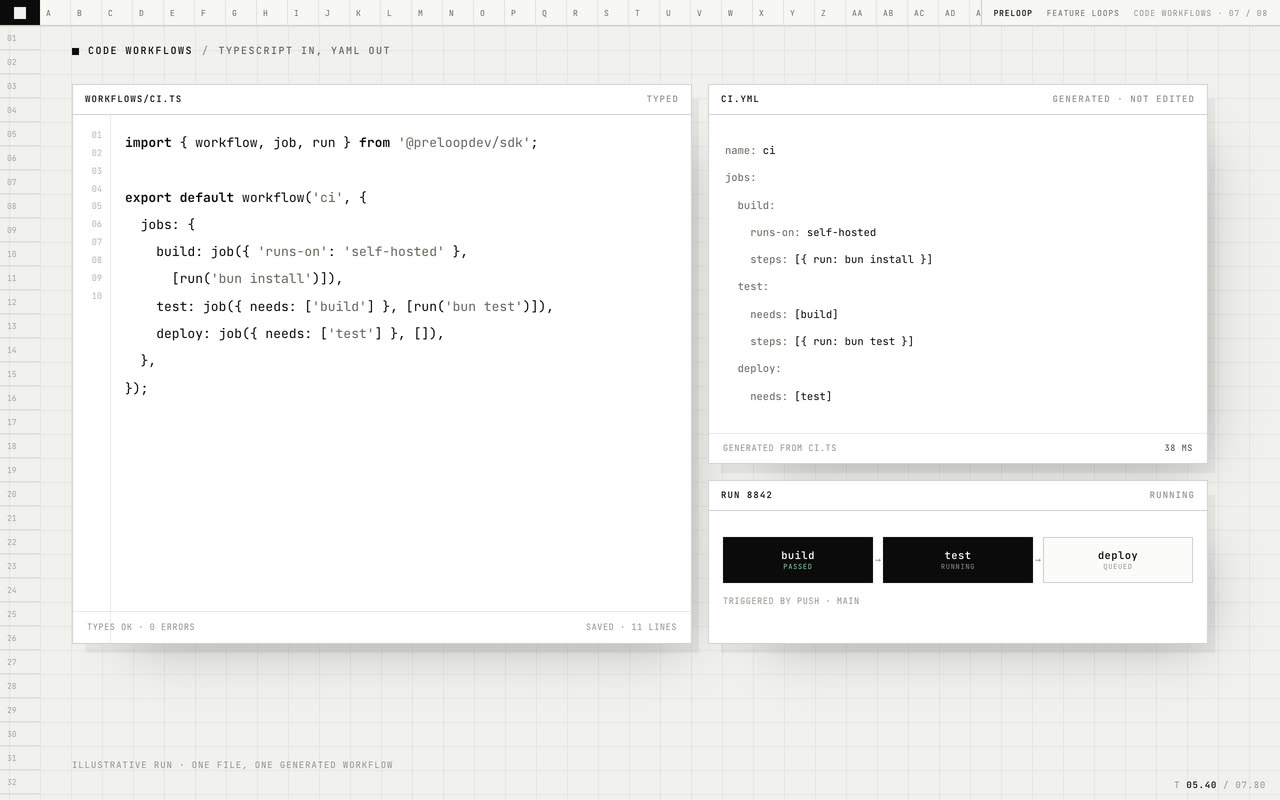
Write your workflows in the language your team already uses. preloop turns them into the standard workflow files GitHub runs.

Workflow files
Unchanged
Availability
Available today
Surface
CLI, API and dashboard
LOOP04beats
01Changesnapshot
02Verifyreplay
03Fixpause
04Mergepublish
code-workflows loop poster
Author the workflow in code, generate the YAML, check it in CI, and commit both.Muted · loops

Why it exists

Workflow YAML gets repetitive as jobs, matrices and shared setup grow, and copy-pasted steps drift out of sync. Code Workflows gives you SDKs for four languages, generates the YAML your provider runs, and fails CI when source and output disagree.

Preloop Code Workflows, step by step.

The mechanism, in the order a job meets it.

  1. 01

    Start or import

    Start from a typed starter that already fits your project: preloop reads your lockfiles and project config to pick the right toolchain and test command. Or import the workflows you have today, composite actions included, without changing them.

  2. 02

    Author

    Write workflows in the language you chose, next to your code. Shared setup becomes a function you call, not a block you paste. Loops and conditions build matrices for you, and the type checker catches a misspelled input or a broken job reference in your editor, before anything runs.

  3. 03

    Generate

    preloop writes standard GitHub Actions workflow files, each one naming the source it came from. It never overwrites a file someone edited by hand without asking.

  4. 04

    Lint and check

    Correctness and security checks run on every generate, including your shell scripts. In CI, a check fails the build when the committed YAML no longer matches its source.

What you get.

Each capability is part of the product today.

01

Reuse, not copy-paste

Put shared setup, caching and deploy steps in a function or module and call it from every workflow. Fix it once and every workflow that uses it picks up the fix — no drift between near-identical YAML blocks.

02

Real programming

Use loops, conditions, variables and your own libraries. Generate a job per package in a monorepo, build matrices from data, and share workflow code across repositories like any other dependency.

03

Type-checked before it runs

Jobs, steps, matrices, expressions and action inputs are typed. A wrong output name, a missing input or a reference to a job that does not exist is a compile error with autocomplete, not a failed run twenty minutes in.

04

Refactor with confidence

Rename a job or step and every reference updates with your editor. Workflow code goes through review, tests and version control like the rest of your codebase.

05

Four first-party SDKs

TypeScript, Python, Go and Rust, published to npm, crates.io, PyPI and Go modules. Each SDK is vendored into your project, so it builds offline and always matches the version that generated it.

06

Any other language

A versioned plugin protocol lets any program describe a workflow, so a language without an SDK still works — no change to preloop needed.

07

Typed action imports

Import any action and get a typed binding, with its inputs and outputs checked and its version pinned to an exact commit.

08

A workflow lockfile

Every action is locked to a verified commit in the same lockfile format GitHub uses, and the hosted runner checks it before a job runs.

09

A secret inventory

Your workflows know which secrets they need — names only, never values — so a missing secret shows up as a lint finding, not a failed run.

10

A security review built in

The full zizmor security audit catalog and permission checks run natively every time workflows are generated.

11

Drift detection

If generated YAML goes stale, goes missing or is edited by hand, CI names the file and fails — before the drift reaches main.

12

Standard output

Generated files are ordinary workflow YAML. Nothing in them depends on preloop to run.

Sample / typescript

Exampletypescript
import { workflow, job, run, uses } from "@preloopdev/sdk";

export default workflow("CI", {
  on: {
    push: { branches: ["main"] },
    pull_request: {},
  },
  permissions: { contents: "read" },
  jobs: {
    test: job({
      "runs-on": "self-hosted",
      strategy: { "fail-fast": false, matrix: { node: [20, 22] } },
      steps: [
        uses("actions/checkout@v6"),
        uses("actions/setup-node@v4", {
          with: { "node-version": "${{ matrix.node }}", cache: "npm" },
        }),
        run("npm ci"),
        run("npm test"),
      ],
    }),
  },
});

This describes the workflow; preloop generates the YAML.

Specs.

Languages
TypeScript, Python, Go and Rust SDKs, plus a plugin protocol for any other language.
Output
Standard GitHub Actions workflow YAML, each file naming its source.
Project detection
Reads your lockfiles and project config to choose the toolchain and test command.
Import
Existing workflow YAML and composite actions become editable source.
Drift gate
CI fails when committed YAML is stale, missing or edited by hand.
Lint
The zizmor security audit catalog, permission checks and shell-script checks.
Lockfile
Actions pinned to verified commits, checked by the hosted runner before a job runs.

Preloop Code Workflows questions

Q.01Is the YAML still in the repository?

Yes. It is generated, committed and reviewed. The source describes how it is produced; the YAML is the workflow your provider runs.

Q.02What happens if someone edits the generated file?

preloop will not overwrite a hand-edited file unless you tell it to, and the CI check reports the edit and fails the job.

Q.03Which languages can I use?

TypeScript, Python, Go and Rust ship as first-party SDKs. Add any other language through the plugin protocol: any executable that reads one JSON request and writes one JSON response.

Q.04Does the generated workflow need preloop to run?

No. It is a standard workflow file your provider runs directly. preloop is only needed for the execution and caching features you add on top.

Q.05What does the linter catch?

Security problems from the zizmor audit catalog, overly broad permissions, floating action references, and bugs in your shell scripts.

Start

Start with one workflow.

We will set it up with you and show you what changes.